
Built for Oman — 5% VAT and Excise before VAT
A till that keeps selling when the internet stops.
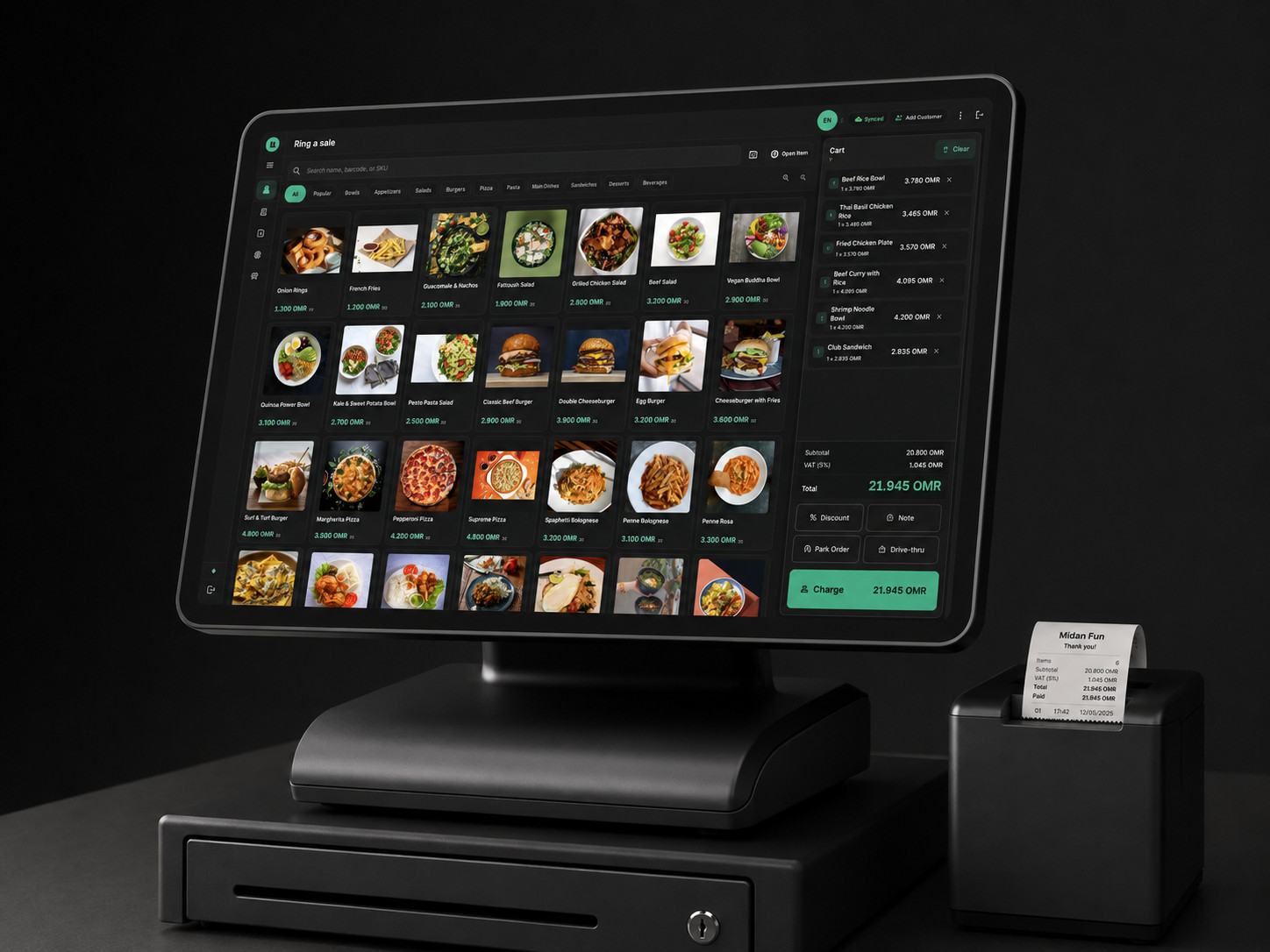
Point POS rings a sale, prints a legal Arabic invoice and opens the drawer without waiting for a server. Everything syncs when the connection comes back — and nothing is lost if it does not come back today.
1.0.14 · 15.0 MB · Windows 10 or 11, 64-bit
- 5% VAT + Excise
- Excise is calculated before VAT, the way Oman requires.
- Exact to the baisa
- Three decimals end to end. No floating-point money, anywhere.
- Arabic, RTL, legal
- Arabic has precedence on the invoice, and it prints properly.
- 80 mm and 58 mm
- Thermal receipts over USB or the network, with a live preview.
- Windows today, Android coming
- The Windows till is published and downloadable now. The Android tablet build is not published yet, and iPad is coming.
- Works offline
- The sale is minted on the device, invoice number and QR included.
The product
Built around how a shop actually runs
Not a generic till with an Arabic translation bolted on afterwards.
Offline first, not offline tolerant
The sale is minted on the device, with its own legal invoice number and QR. A dropped connection during a rush costs you nothing.
Oman tax, correctly
5% VAT, Excise calculated before VAT, and the full-invoice threshold at 500 OMR applied automatically. Money is exact to the baisa — three decimals, never a rounded float.
Arabic invoices that print
Arabic has legal precedence on an Omani invoice, and thermal heads cannot shape it. Point renders it properly, on 80 mm or 58 mm paper, over USB or the network.
One binary, every store
Install it, enter your store domain and licence serial, and the till configures itself. Updates arrive the same way — offered, never forced mid-shift.
Who it is for
One till, several kinds of shop
Nine shop profiles, with the capabilities set per branch — so one owner runs a restaurant, a bakery and a produce shop on a single account.
-
Grocery and minimarket
Barcodes, weighed items, batches and expiry.
-
Fruit and vegetables
Scale barcodes, tare weight, price per kilo.
-
Butcher
Cut sheets, weighed sales, yield and waste.
-
Bakery
Production runs and recipes, batches and expiry.
-
Coffee Roastery
Recipes and yield, weighed bags, batch tracking.
-
Restaurant
Tables, kitchen tickets, moving a table and splitting a bill.
-
Café
Fast tickets, priced modifiers, a taxable service charge.
-
Large and multi-branch store
Stock and transfers between branches, reports consolidated and broken out.
-
Electronics
Serial numbers per unit, warranty claims and returns.
-
Gym and fitness
Membership plans, renewals and gate check-in.
Compliance
Your invoices are ready before you are asked for them
Omani e-invoicing is being phased in by the Tax Authority, and under its model an invoice reaches it through an accredited service provider — not from the cash register. What a till has to get right is the invoice itself, and that part is done here from the first sale.
A sequential invoice number
Every invoice carries a number in an unbroken sequence, minted on the device even while it is offline.
The tax broken out
Net, Excise, VAT and the total, each shown separately — with Excise calculated before VAT.
Simplified or full, decided for you
Once the amount before VAT reaches 500 OMR the invoice becomes a full tax invoice and asks for the buyer VAT number.
A QR code on the receipt
Printed on every receipt, from the same figures the invoice was built on.
Invoices are kept in full, so what an audit asks for is already recorded rather than reconstructed.
Getting started
From subscribing to your first sale
-
1
Subscribe
Pick a plan and pay, and your store domain and licence serial are issued the moment the payment settles. A free trial is reviewed by us first.
-
2
Activate the till
Install on Windows, enter the domain and serial, and the device asks to join your store.
-
3
Ring a sale
Sign in with an operator code and PIN, ring the first sale and print it.
Simple pricing, in Omani Rial
From 12.000 OMR / month
Start with 14 days free — one till, no payment card. Add more tills to any plan as seats.
Questions
The things buyers ask first
Does it keep working when the internet goes down?
Yes. The sale is completed on the device itself, with its own invoice number and QR code, and the receipt prints straight away. When the connection returns everything syncs on its own, in order, with nothing entered twice.
Does it calculate Omani VAT and Excise correctly?
It applies 5% VAT and calculates Excise before VAT, and it moves from a simplified to a full tax invoice on its own as soon as the amount before VAT reaches 500 OMR — or on any sale to a business that gives its VAT number. Amounts are held to three decimals, so a baisa is never lost to rounding.
Is the invoice in Arabic?
Yes, and it prints properly on a thermal printer — 80 mm or 58 mm, over USB or the network. Arabic has legal precedence on an Omani invoice, so it is not a translation added on top.
What does Point POS run on?
The Windows till is published and you can download it now — Windows 10 or 11, 64-bit. An Android tablet build is coming, and iPad after it. The back office runs in any browser.
What about e-invoicing (Fawtara)?
Under the Omani model an invoice reaches the Tax Authority through an accredited service provider — no cash register connects to it directly. Point records every sale with what such a submission needs: a sequential invoice number, the tax breakdown, the buyer VAT number, and a QR code on the receipt.
Can one account cover more than one branch or more than one trade?
Yes, on a plan that includes more than one branch. Each branch keeps its own stock, its own cash sessions and its own devices, and is given the profile of its trade — so a restaurant, a bakery and a produce shop can sit under one account. Each till is a seat you add to your plan.
Which hardware does it work with?
Thermal receipt printers over USB or the network, a barcode scanner, a cash drawer opened by the printer, and a weighing scale that prints a barcode label. There is no locked-down hardware to buy from us.
Try it on your own counter
Install the Windows till, connect a thermal printer and ring a sale. You need a store domain and a licence serial to activate it.